

Network Password Manager 5.2
Store and manage passwords within enterprise
Program info
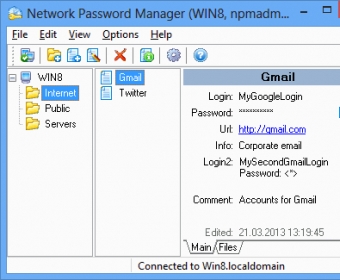
Network Password Manager is a multi-functional program for storage, management and protection of valuable information containing passwords. Unlike similar desktop programs, it supports the multi-user mode. It also provides a common information environment and can create centralized data backup.
Network Password Manager guarantees the most reliable protection: all your vital data will be secured safely using 256-bit AES encryption. Network Password Manager also supports standard Windows user groups, so you can easily set access rights for any user. It has a built-in customizable password generator. A hot key feature is included in this application to automate the inserting of logins and passwords.
More than just passwords and logins can be kept. The program can also store additional information, such as URLs, comments, files, custom fields, etc. Installing and tuning up this program is easy and understandable for everyone. The administration process is simple. Network Password Manager comes with a user-friendly interface that is both flexible and easy to use.
Details
Extensions

No information available
The data will be available later.Awards

Related software

Protects your online privacy, hides your true IP address for a secure access.

Protection for your data, identity, and privacy on every device you own.

High-end password management and protection with MFA and AES-256 encryption.
Related stories
See all
Explore lesser-known AI tools like Adobe Firefly, Freepik, Canva, DreamStudio, and Ideogram for stunning social media imagery.
So what are all those lines in the Task Manager? Learn about the essential processes like svchost.exe, winlogon.exe, and other mysterious items.

Windows Task Manager can take you beyond monitoring and into detection of unusual activities. Let's see how it works.


Comments