

Network Password Manager 4.5
Network Password Manager provides easy enterprise password management
Program info
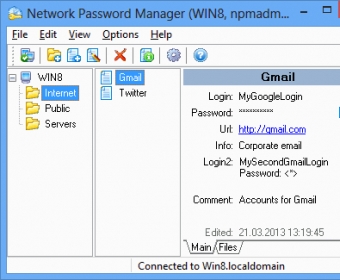
Network Password Manager is an enterprise password management tool for businesses of any size. Using a single multiple user database, it provides a convenient and centralized location for management all of the user accounts in your company. It provides all of the standard functions, working together with Windows access rights in addition to providing a wide range of other powerful tools. It presents network administrators and those in charge of enterprise IT security a user-friendly Explorer-like interface for a minimal learning curve. It also provides a number of flexible administration options. It provides support for multilingual computing, making it ideal for use in workplaces all over the world. The latest version is available as a free 60-day trial and there is also a free edition available for home users. Learn more about this powerful enterprise password management software at Network Password Manager web site. You will also be able to find the release notes for the latest version here.
Details
Extensions

No information available
The data will be available later.Awards

Related software

Protects your online privacy, hides your true IP address for a secure access.

Protection for your data, identity, and privacy on every device you own.

High-end password management and protection with MFA and AES-256 encryption.
Related stories
See all
Explore lesser-known AI tools like Adobe Firefly, Freepik, Canva, DreamStudio, and Ideogram for stunning social media imagery.
So what are all those lines in the Task Manager? Learn about the essential processes like svchost.exe, winlogon.exe, and other mysterious items.

Windows Task Manager can take you beyond monitoring and into detection of unusual activities. Let's see how it works.


Comments